

Xojo Syntax Support
Upgrade the Xojo workflow inside VS Code
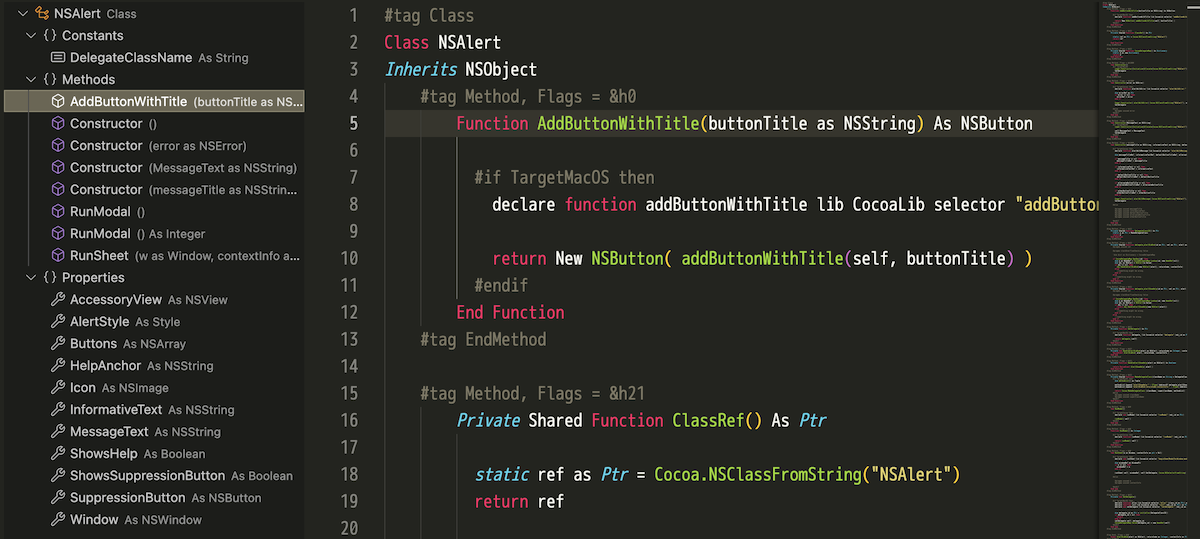
A VS Code extension for the Xojo programming language. It adds syntax highlighting and outline views through DocumentSymbolProvider for .xojo_code, .xojo_window, .xojo_menu, and .xojo_script files. On macOS it can also integrate with Xojo so F5 reloads and runs the project.
v0.9.0 · 2025/10/4
What's new · v0.9.0 · 2025/10/4
- Added outline support for the menu hierarchy in
.xojo_menufiles. - Implemented
parseXojoMenuSymbolsto parse the nested structureBegin Menu→Begin DesktopMenuItem. - Assigned a SymbolKind per menu item type (DesktopMenuItem, DesktopQuitMenuItem, DesktopApplicationMenuItem, etc.).
- Reads the
Textattribute and shows it as the detail for each menu item. - Represents separators (
Text = "-") asSymbolKind.Null. - Verified menu hierarchy display with the
MainMenuBar.xojo_menusample.
0.8.0
- Implemented multi-level handling for
#tag Eventsblocks so events of nested controls are correctly parented. - Extended
parseCommonTagBlocksto support hierarchical array-stylecontrolsByName. - Automatically builds control paths (parent chains) and prefers the nearest scope when duplicate control names exist.
- Manages control info in
{name, path, symbol}form insideparseXojoWindowSymbols. - Verified hierarchical events using the
settingWindow.xojo_windowsample's#tag Eventsblocks.
0.7.0
- Enhanced
.xojo_windowcontrol hierarchy detection to display parent-child relationships based on theInitialParentattribute. - Improved nesting so children appear properly under container controls like DesktopTabPanel.
- Added the
settingWindow.xojo_windowsample to provide a test environment for hierarchical control structures.
0.6.0
- Expanded
.xojo_codeoutline to support top-level objects other than Class (Module / Interface / Structure / Enum). - Implemented
parseXojoObjectSymbolsto automatically apply suitable grouping per object type. - Added sample files:
SampleModule.xojo_code,SampleInterface.xojo_code,SampleStructure.xojo_code,SampleEnum.xojo_code.
0.5.0
- Added Xojo Reload and Run feature (macOS only).
- Added F5 execution via a debug provider.
0.1.0
- Initial release: minimal highlighting (comments / strings / numbers / keywords / types).
Make Xojo code shine in VS Code.
Highlighting, outlines, and one-click run support for day-to-day Xojo development.
Syntax highlighting
Highlights comments (' / REM / // / #), strings, numbers, control keywords, declaration keywords, primitive types, and function names for both declarations and calls.
Outline view for .xojo_code
Builds outline hierarchies such as Class, Module, Interface, Structure, and Enum with grouped Methods, Properties, Events, and Constants.
Outline view for .xojo_window
Shows Window, Controls, Events, Methods, Properties, and MenuHandlers in outline form, with accurate parent-child detection from InitialParent.
Outline view for .xojo_menu
Recursively parses menu hierarchies and renders them in the outline so complex menu structures remain easy to understand.
Xojo integration on macOS
Provides macOS-only Xojo integration. F5 can trigger Xojo Reload and Run, and launch.json can be generated automatically for quick project startup from VS Code.
Supported file types
Supports .xojo_code, .xojo_script, .xojo_window, and .xojo_menu files. Generic code files can also expose flat lists of Sub, Function, Method, Event, and Delegate symbols.