

A lightweight syntax highlighting extension for the Xojo programming language.
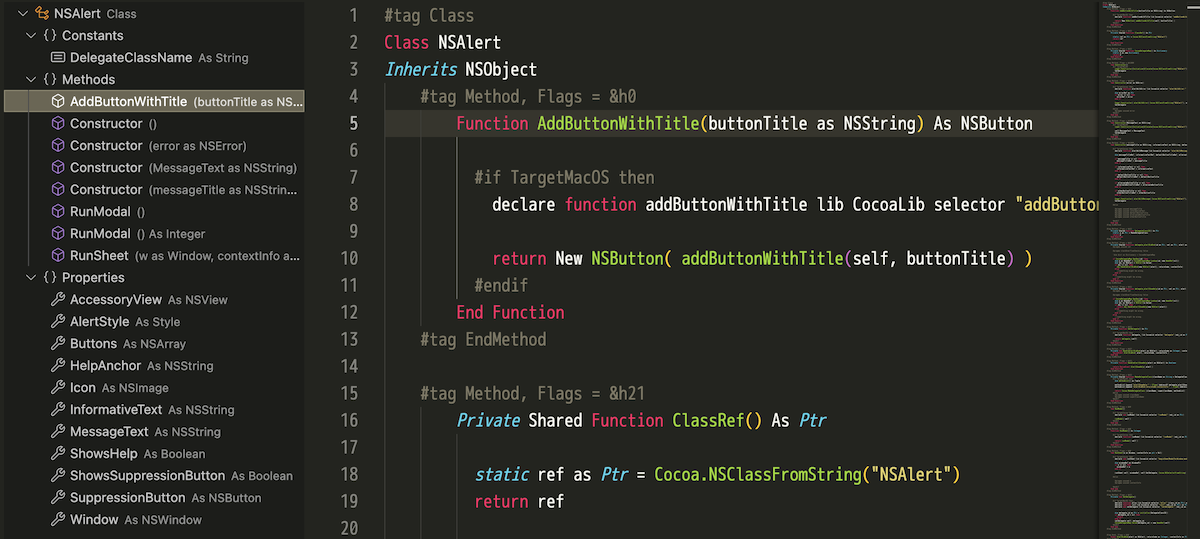
Features
Syntax Highlighting
- Comments (' / REM / // / #)
- Strings (double quotes)
- Numbers (integers and floats)
- Control flow and declaration keywords
- Primitive types
- Function names (declarations and calls)
Outline View (DocumentSymbolProvider)
-
.xojo_window: Window → Controls → Events/Methods/Properties/MenuHandlers -
.xojo_code: Class/Module/Interface/Structure/Enum → Methods/Properties/Events/Constants -
.xojo_menu: Menu → DesktopMenuItem → (Submenu items) -
.xojo_libraryAPI files: Open Xojo files stored under the zipped libraryAPIfolder as read-only virtual documents - Generic code files: Flat list of Sub/Function/Method/Event/Delegate declarations
Xojo Integration (macOS only)
- Xojo Reload and Run (F5 key or from Command Palette)
- Auto-generate default
.vscode/launch.jsonconfiguration
Installation (Local Development)
- Open this folder in VS Code
- Start debugging the extension from Run and Debug (F5)
- In the new VS Code window, open
.xojo_code/.xojo_scriptfiles to verify syntax highlighting
Package Creation (VSIX) and Local Installation
To use the extension in normal mode without debugging, create and install a VSIX package.
Creating the VSIX
With Node.js installed, you can create the package with npx. Run from the project root:
cd vscode_xojo_syntax
npx @vscode/vsce package
On success, xojo-syntax-<version>.vsix will be generated in the project root.
Installing the VSIX
- From VS Code Command Palette → "Extensions: Install from VSIX…" and select the
.vsixfile - Or from CLI:
code --install-extension xojo-syntax-0.1.0.vsixTo reinstall the same version, add --force:
code --install-extension xojo-syntax-0.1.0.vsix --forceVersion Update Tips
- Increment the
versioninpackage.jsonbefore repackaging to allow updates without--force. - If you plan to publish to the Marketplace in the future, adjust
.vscodeignoreto include the README and other documentation (currently excluded).
Supported Files
- Language ID:
xojo - Extensions:
.xojo_code,.xojo_script,.xojo_window,.xojo_menu - Library API viewer:
.xojo_libraryfiles can be opened with Xojo: Open Library API File
Known Limitations
- Not fully compatible with the official Xojo IDE
- Minimal string escape sequence handling
-
.xojo_librarysupport opens API text files from the archive; it does not edit or rewrite the library archive
License
MIT